


Team celebrating a win on the court
Live BallerStream

Stream your games live. Scoreboard on. Crowd in the chat.

Go live from your phone in 1080p. Keep score on screen, let fans comment and tip, charge admission if you want to, and the replay lands on your BallerTube page. Athletes, fans, teams and organizations can all stream.

No equipment, no download, no cost to start. A phone and a free account.
Live right nowChecking the live server... Open Watch Live →
Why it is a big deal

Every game deserves a broadcast. Now every game gets one.

Nobody is televising a 16U Saturday showcase. The grandparents two states away, the teammate at home with a sprained ankle, the coach who could not make the trip: they all miss it. With BallerStream a parent on the baseline turns a phone sideways and the whole game goes out live, with the score on screen and the people who care watching and talking in the chat.

And it does not vanish when the buzzer sounds. Save the stream and it becomes a video on your BallerTube page, next to your highlights and your profile, where coaches and fans find it later. Game night becomes game tape.

Batter swinging in front of a packed crowd Sprinter driving out of the blocks on a track
0Streams live right now 30+Saved replays to watch
1080pStream quality from a phone
$0To go live. Charge admission if you want
BallerStream

A broadcast booth in your pocket

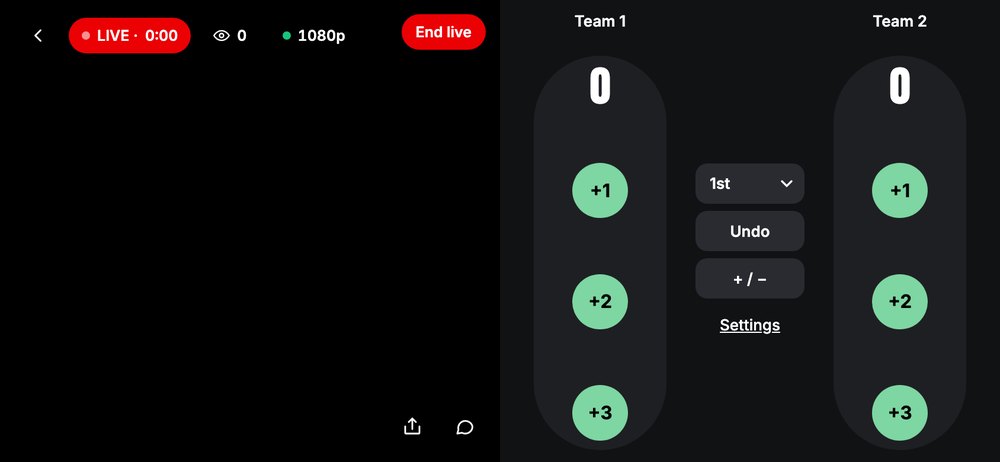
This is the real BallerStream screen: the game on the left, scoring on the right, viewers and chat on top.

BallerStream broadcaster screen with LIVE timer, viewer count, 1080p, End live button and a scoring panel with +1, +2, +3, period and undo
Live in 1080p Scoreboard on screen Viewer count Live chat Tips Pay-per-view Share link

Scores update on every viewer's screen the moment you tap them. Periods, team names, undo and a plus or minus switch are all one tap away.

Who goes live

Athletes, fans, teams and organizations

Same button, same quality, four very different reasons to press it.

High school basketball players lined up on the court

Athletes

Your own channel, live, whenever you have something to show.

  • Hang Out Live. Hold the phone upright and talk: workouts, Q&As, reactions, the drive home after a win. Vertical, with comments and tips.
  • BallerStream for games. Hand the phone to a parent, turn it sideways, and your game goes out with the score on screen.
  • Fans can tip you. A Leave a tip button sits under every stream. Tips and admission are paid out to your wallet through Stripe.
  • Saved streams become game tape. Tap Save when you end, and the replay is a video on your profile for coaches to find.
  • Followers get the link. Share to your socials and the team chat in one tap, straight from the live screen.
Go live as an athlete No profile yet? Create one free, it takes two minutes.

Player signing for young fans after a game

Fans and parents

Be the broadcast for everyone who could not make the game.

  • One phone, the whole family watching. Grandparents, cousins, the teammate who is hurt: send the link and they are courtside.
  • Keep the score as you go. Tap +1, +2 or +3 and every viewer sees it. Undo if you tap the wrong team.
  • The chat is the bleachers. Viewers comment live; you see them on screen and can reply between plays.
  • Save it for your athlete. Save the stream, tag your player in the upload form, and the game lands on their profile as real game tape.
  • Nothing to learn. Good light, steady hands or a tripod, Wi-Fi or strong 5G. Pick a stream type and press Go live.
Stream a game for your athlete Sign up as Fan/Parent. You can add and manage your athlete's profile from your own.
Soccer team lined up in blue kits

Teams and organizations

Run your own sports network, one game at a time.

  • Charge admission. Flip the switch, set $2, $5, $10 or your own price, and viewers pay once to watch until the stream ends.
  • Every game, saved to the team page. Saved streams sit on your team and organization pages as a season archive families and recruiters can browse.
  • Scoreboard with your team names. Enter the matchup before you go live and it is on screen for the whole broadcast.
  • Tag the roster. When you save a game, tag the athletes who played and the film shows on each of their profiles.
  • Bigger productions welcome. Streaming from a camera rig or a laptop? Your stream key for OBS is in the Share sheet.
Stream your next game Need a team or organization account first? Set one up here.
What is on the screen

Everything a real broadcast has

Built for sports, not borrowed from a social app.

Live scoreboardTeam names, score, period
Live chatViewers comment, you reply
Pay-per-viewSet a price, viewers pay once
TipsFans tip from the stream
1080pFull HD from a phone
Saved to your pageReplay on your profile or team
Share linkSocials and group chats
Viewer countSee the crowd grow
How it works

Live in four taps

These are the real screens. From the sideline to on air in under a minute.

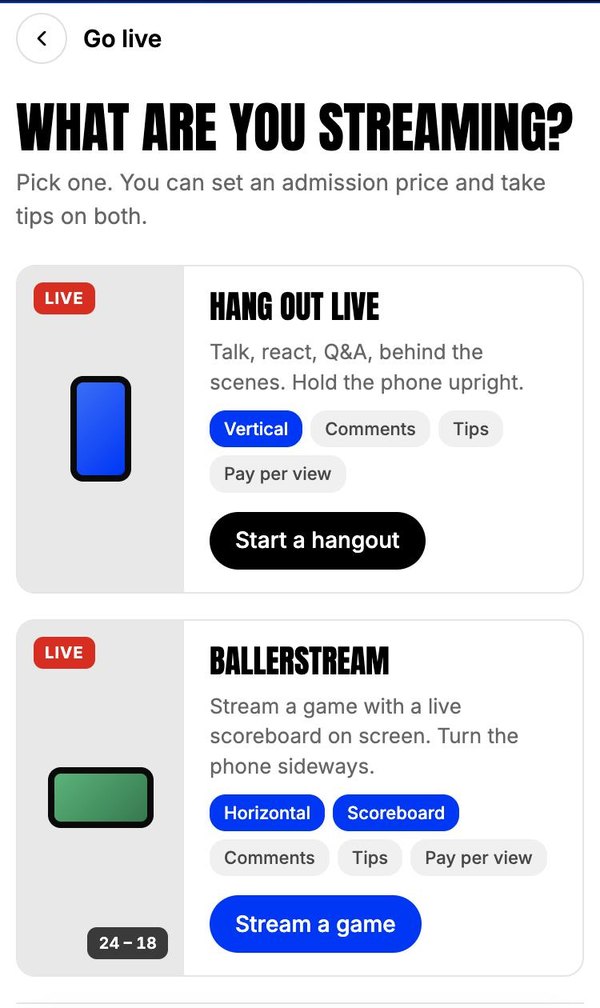
1. PickGo live screen: Hang Out Live or BallerStream

Pick your stream

Hang Out Live for a vertical chat with your followers, or BallerStream for a game with the scoreboard on. You can take tips and set a price on both.

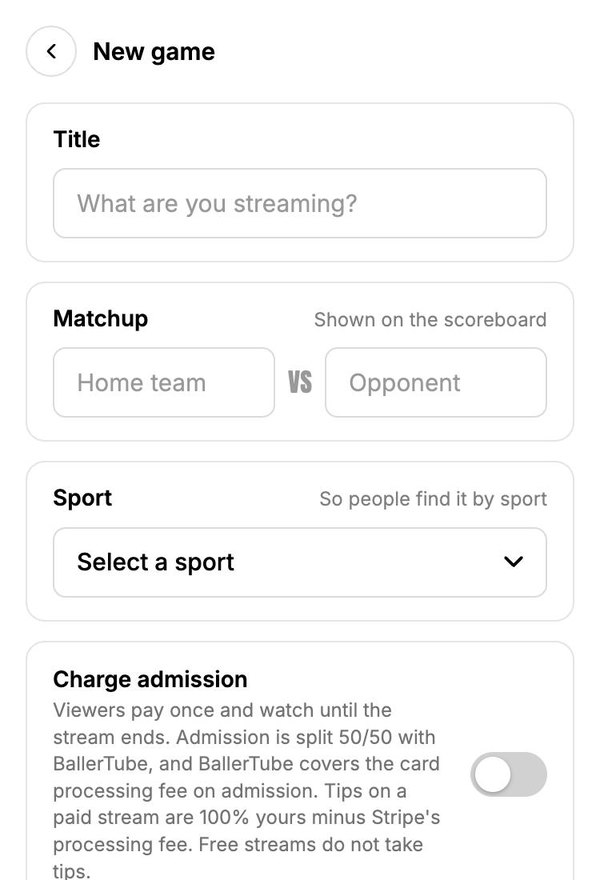
2. Set upNew game form: title, matchup, sport and the charge admission switch

Name the game

Title, the matchup for the scoreboard, the sport so people find it, and the Charge admission switch if this one is pay-per-view.

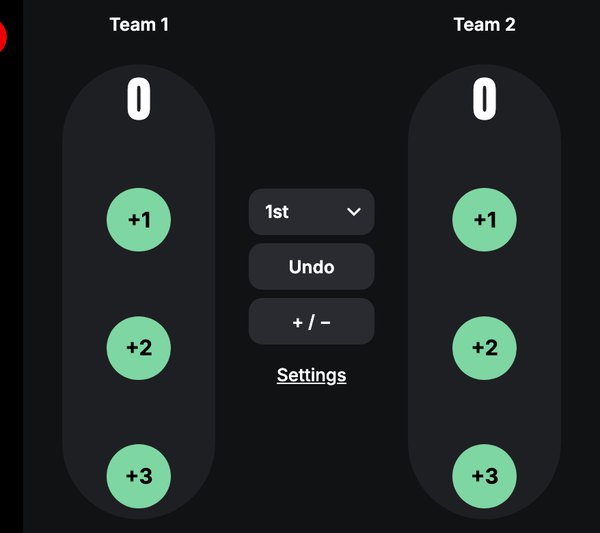
3. Go liveBallerStream scoring panel with +1, +2, +3 buttons, period selector and undo

Turn the phone sideways

Press Go live. Tap the score as it happens, watch the viewer count climb, and reply to the chat between plays.

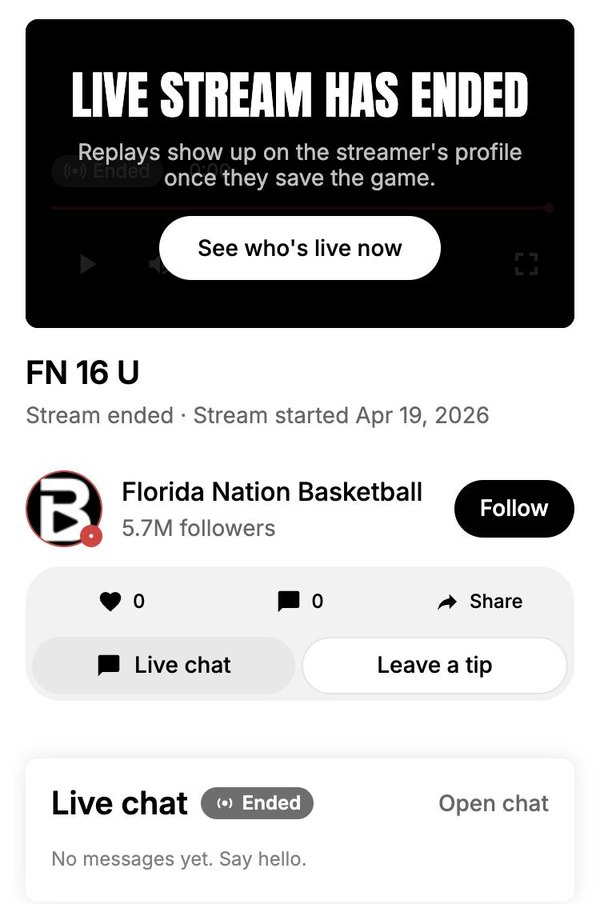
4. SaveStream ended screen: replays show up on the streamer's profile once they save the game

End and save

Tap End, then Save. Add a title, tag the athletes, and the replay posts to your profile, team or organization page as a video.

Go live now Going live needs a free account. Create your profile in four steps.
Watch

Live now and latest replays

All streams and replays →
Ready when you are

Your sideline. Your broadcast.

Free to go live, free to watch unless you decide otherwise. Set a price and the people who pay are the people who get in.

Start a stream

No account yet? Create your profile

Make it pay-per-view

Flip Charge admission when you set up the game and pick a price. Viewers pay once and watch until the stream ends. Admission is split 50/50 with BallerTube, which covers the card processing fee. Tips on a paid stream are 100% yours minus Stripe's fee. Everything is paid out to your BallerTube wallet.

$2$5$10Own
Creator earnings and payouts →
Questions

Before you go live

Who can stream on BallerTube?

Anyone with a free account: athletes, fans and parents, coaches and trainers, media, teams and organizations. Pick your account type when you sign up and the Go live button is in your Create menu.

Do I need any equipment?

A phone and a connection. Good light, steady hands or a tripod, and Wi-Fi or strong 5G. Your stream goes out in 1080p. If you have a camera rig or a laptop with OBS, your stream key is in the Share sheet on the live screen.

How does the scoreboard work?

Enter the two team names when you set up the game. On the live screen you tap +1, +2 or +3 for either team, switch periods, and undo a mistake. Every viewer sees the score update instantly on their screen, and it stays with the replay.

Can viewers comment during the stream?

Yes. Live chat runs beside the video on desktop and as a sheet on phones. Comments appear on your broadcaster screen so you can answer between plays, and viewers can also like, share and leave a tip.

How does pay-per-view admission work?

Flip Charge admission when you set up the stream and choose $2, $5, $10 or your own price. Viewers pay once through Stripe and can watch until the stream ends. Admission is split 50/50 with BallerTube, which covers the card processing fee, and tips on a paid stream are 100% yours minus Stripe's fee. You enable payouts once from the Go live form; after that, admission and tips land in your BallerTube wallet.

Where does my stream go after it ends?

When you tap End you can save it. Saved streams become a video on your profile, or on your team or organization page, and they appear in the replays on Watch Live. Streams you do not save are not published anywhere.